 PHP Ready
Upgrade PHP without guessing what breaks.
PHP Ready reads every plugin and your theme on your own server and gives you a straight verdict for PHP 8.1 to 8.4.
Your host says PHP 7.4 is going away. Which plugin takes the site down?
Most people find out after the upgrade, from a white screen. PHP Ready answers the question before you touch anything.
From Plugins, Add New. No account, no license key, nothing to configure.
Pick the PHP version you plan to move to. The scan runs in short batches with a progress bar and resumes if you close the tab.
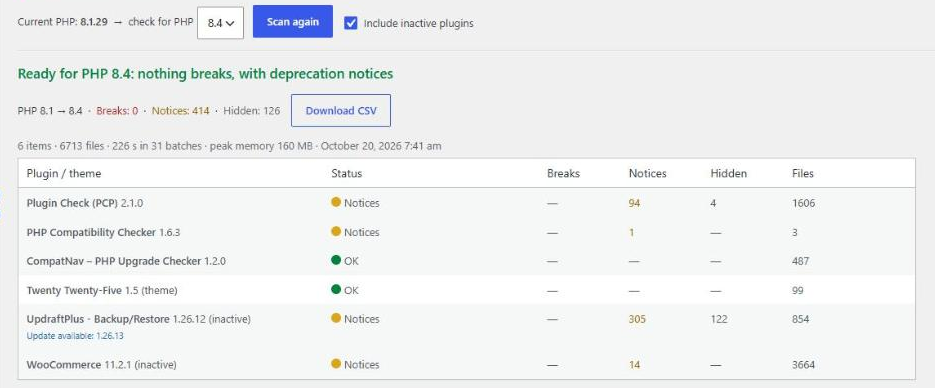
Breaks are separated from deprecation notices, with file and line. A short list tells you what to do first: update, replace or ignore.
A verdict you can act on, not a wall of warnings.
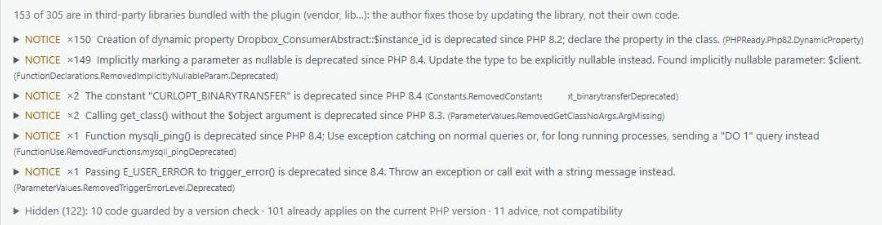
Other checkers dump hundreds of findings on you. PHP Ready sorts them into three buckets and explains each one.
A fatal error on the target version: a function that no longer exists, an argument order that is no longer accepted. This is what stops the site.
Still works, but PHP marks it as deprecated and writes a line in the error log. It will break in a future version, not in this one.
Code guarded by a version check, findings that already apply to the PHP you run today, and style advice. Shown on request, with the reason.
Runs where other checkers give up.
- Shared hostingBatches of a few seconds each, so the 30-60 second request limit of shared hosts never hits. Close the tab and come back: it picks up where it stopped.
- No exec(), no shell, no external serverYour code never leaves your site. That is also why it works on SiteGround, Kinsta, WP Engine and other hosts that disable exec().
- Checks what others skipMust-use plugins, drop-ins (advanced-cache.php, object-cache.php, db.php), the parent theme, and every class of WordPress core, so a plugin that extends WP_Widget or WC_Payment_Gateway is checked properly.
- Built on PHPCompatibility176 rules maintained by the PHP community since 2012, running on PHP_CodeSniffer, bundled in the plugin, plus PHP Ready's own detectors for PHP 8.2 dynamic properties and relative callables.


The verdict also shows up in Tools, Site Health, so it is visible to anyone who looks after the site.
Fifty sites? Use the command line.
The same scan is available as a WP-CLI command. Exit code 1 means something active breaks, so you can loop over every site you maintain and only open the ones that need attention. Results export to CSV from the admin screen as well.
# one site, human-readable
wp phpready scan --target=8.4

# fifty sites, machine-readable
for site in /var/www/*; do
  wp phpready scan --target=8.4 --format=json \
     --path="$site" || echo "NEEDS WORK: $site"
done
PHP Ready Pro, for people who maintain other people's sites.
The free plugin does the full scan and always will. Pro adds the parts an agency or freelancer needs to do it for twenty clients without thinking about it.
In development
Planned price: around 39 € per year for one site, with an agency plan for unlimited sites.
Want to know when it ships? Install the free plugin: the notice will appear there, and nowhere else.
- Scheduled scans with email alertsA plugin update introduces an incompatibility while you are not looking. You get an email the same day, not a white screen two months later.
- PDF and CSV report for the clientA clean document that says "your site is ready for PHP 8.4" or "these three plugins need replacing", with your name on it.
- Whitelist of false positivesMark a finding as reviewed once, per plugin, and it stays out of every future report.
- Multisite and unlimited sitesNetwork-wide scan from one screen, and one license for every site you look after.
Questions people ask before installing
Does it send my code anywhere?
No. Everything runs on your server, inside WordPress. The plugin makes no external requests at all, and this website sets no cookies and loads nothing from third parties.
How long does a scan take?
About 15 milliseconds per PHP file. A site with WooCommerce and a dozen plugins (around 5,000 files) takes one to two minutes, in batches of a few seconds each.
Can a static scan catch everything?
No, and anyone who tells you otherwise is selling something. It reads code; it does not run it. Problems that only appear at runtime are out of reach for any scanner. Treat "nothing breaks" as "nothing we can see breaks", and keep a backup before any upgrade.
Which PHP versions can it check?
The plugin needs PHP 7.4 or newer to run and checks your site against PHP 8.1, 8.2, 8.3 or 8.4. Findings that already apply to the version you run today are kept separate, so you only see what the upgrade itself changes.
Does it check inactive plugins?
By default it checks active plugins, the active theme and its parent, must-use plugins and drop-ins. Tick "Include inactive plugins" to scan everything, which is useful before deleting what you do not need.
Is it really free?
Yes. The plugin is GPL v3 or later, built on PHP_CodeSniffer (BSD-3-Clause), PHPCompatibility and PHPCSUtils (LGPL-3.0-or-later). There is no feature in the free version that stops working after a trial.